 News, Views & Insights
Computational Chemistry with Wolfram: From Learning to Research
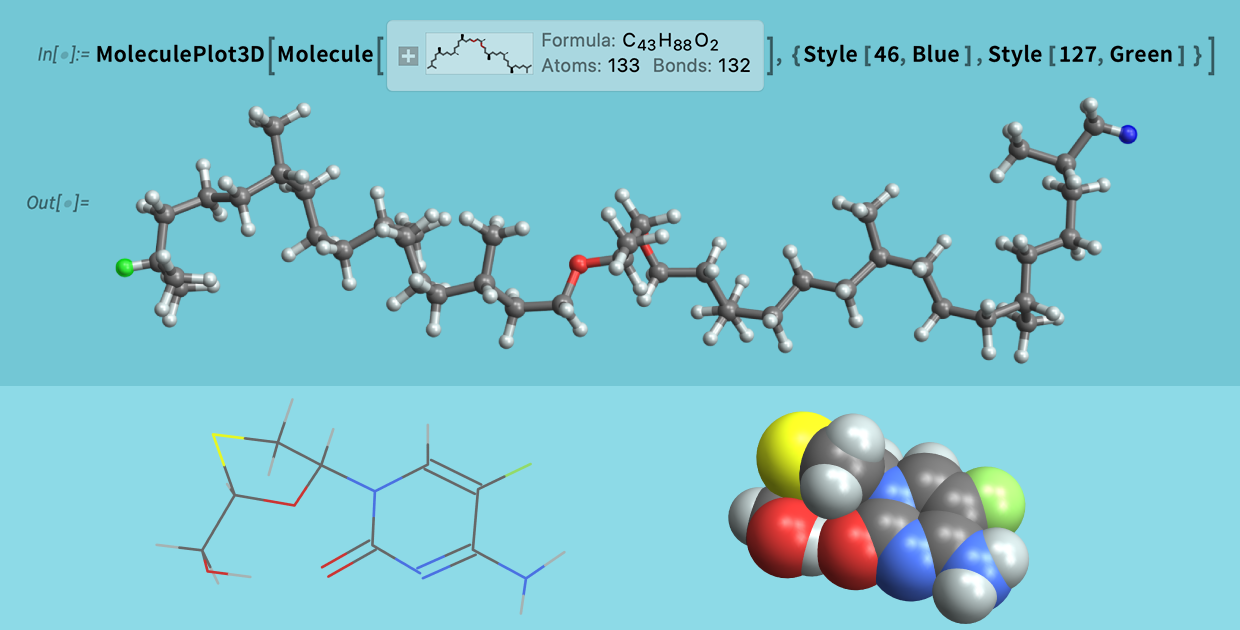
Modern chemistry depends on computation at nearly every stage of the scientific process. Chemists begin by representing molecular structures, then analyze chemical data, investigate molecular behavior and visualize the results of their work. Those tasks require computational tools that support scientific workflows rather than isolated calculations. Today, computation is as fundamental to chemistry as the laboratory itself.
Computational chemistry often requires moving among specialized applications, which interrupts workflows and requires information to be transferred from one tool to the next. Wolfram brings those capabilities together in a single computational environment, allowing work completed in one stage of the workflow to become the foundation for the next. The resources in this guide illustrate how those connected capabilities support chemistry from introductory learning to advanced research.
Representing Chemical Structures
Accurate computational representations of molecules and their bonds provide the foundation for everything from reaction modeling to experimental analysis. Wolfram combines symbolic molecular representations with interactive visualization, allowing the same chemical structures to be analyzed, shared and extended throughout a computational workflow.
Featured Resource: MoleculeView
The Wolfram Language function MoleculeView generates synchronized two-dimensional and three-dimensional views of a molecule, connecting symbolic chemical notation with interactive molecular structures.
 Engage with the code in this post by downloading the Wolfram Notebook
Beyond systematic chemical names, MoleculeView can interpret multiple chemical representations—including chemical entities, SMILES strings and biological sequences—to visualize molecular structures from a variety of inputs.
Explore More
- MoleculeDraw — Draw chemical structures interactively and convert them into computable molecular objects for visualization, analysis and modeling.
- Wolfram|Alpha Chemical Elements — Explore the periodic table, compare elemental properties and investigate chemical classifications through curated Wolfram|Alpha examples.
- PeriodicTablePlot — Generate periodic tables that color code elemental properties or highlight individual elements, groups and classifications for analysis or presentation.
Computing & Analyzing Chemical Data
Molecular representations provide the foundation, but chemistry advances through computation and analysis. Wolfram builds on those representations with computational tools that help chemists model chemical systems, analyze experimental results and compare theory with observation.
Featured Resource: Beer’s Law
The Wolfram Demonstrations Project combines interactive computation with scientific visualization. This Beer’s Law demonstration shows how wavelength and concentration affect absorbance in real time.
By adjusting parameter sliders, users can immediately see how absorbance changes and compare calculated values with measured results, reinforcing the connection between mathematical models and experimental observations.
Explore More
- Mathematica & Wolfram Language: Fast Introduction for Chemistry Students — An interactive Wolfram Notebook introducing molecular representations, chemical entities, reactions, stoichiometry and other core concepts in computational chemistry.
- Wolfram Chemistry Core Area Page — Explore Wolfram’s chemistry ecosystem, including tools for molecular modeling, chemical data, reaction analysis, visualization and computational chemistry.
- New Developments in Wolfram Chemistry — Learn about additional functionality in Wolfram Language, including new molecular data structures, chemistry functions and paclets that extend computational chemistry workflows.
Teaching with Interactive Chemistry Tools
Interactive computation transforms chemistry from a subject that is only explained into one that can be explored. Wolfram provides educational resources that encourage experimentation while helping instructors integrate computational chemistry into the classroom.
Featured Resource: Wolfram Notebooks for Teaching Chemistry
Wolfram Notebooks for Teaching Chemistry is a Wolfram U course that introduces educators to using interactive Wolfram Notebooks in chemistry instruction. Through practical examples, it demonstrates how interactive notebooks can support chemistry instruction through executable examples and classroom-ready activities.
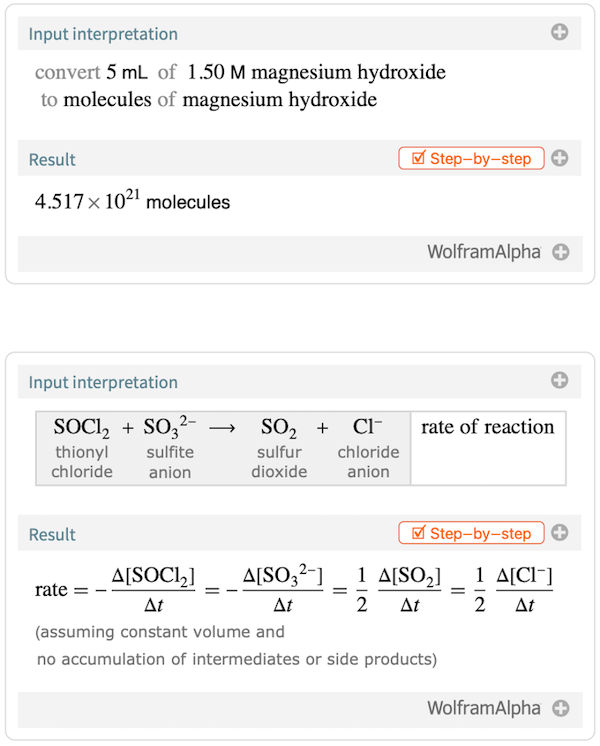
The course also demonstrates how instructors can adapt notebooks for their own classes and publish interactive teaching materials for students.
Explore More
- Wolfram for Chemical Education — Access Wolfram’s central hub for chemistry education resources, including interactive lessons, classroom activities, programming examples and teaching materials.
- Wolfram|Alpha Examples for Step-by-Step Chemistry — Learn chemistry concepts by working through guided step-by-step solutions covering stoichiometry, reactions, equilibria, thermodynamics and other core topics.
- Interactive Chemistry Demonstrations — Explore hundreds of interactive examples at the Wolfram Demonstrations Project that cover molecular structures, bonding, spectroscopy, thermodynamics and other chemistry concepts.
Advancing Computational Chemistry
The same computational tools used to solve chemistry problems can also support advanced research in areas such as structural biology and bioinformatics. Wolfram extends those capabilities with specialized functions and research resources that allow scientists to develop new computational methods while building on the same computational foundation.
Featured Resource: BioMoleculePlot3D
BioMoleculePlot3D creates three-dimensional visualizations of proteins and other biomolecular structures directly from Wolfram Language. It works with BioSequence objects and integrates with public structural databases, making it easy to move from sequence data to interactive molecular models for analysis, visualization and research:
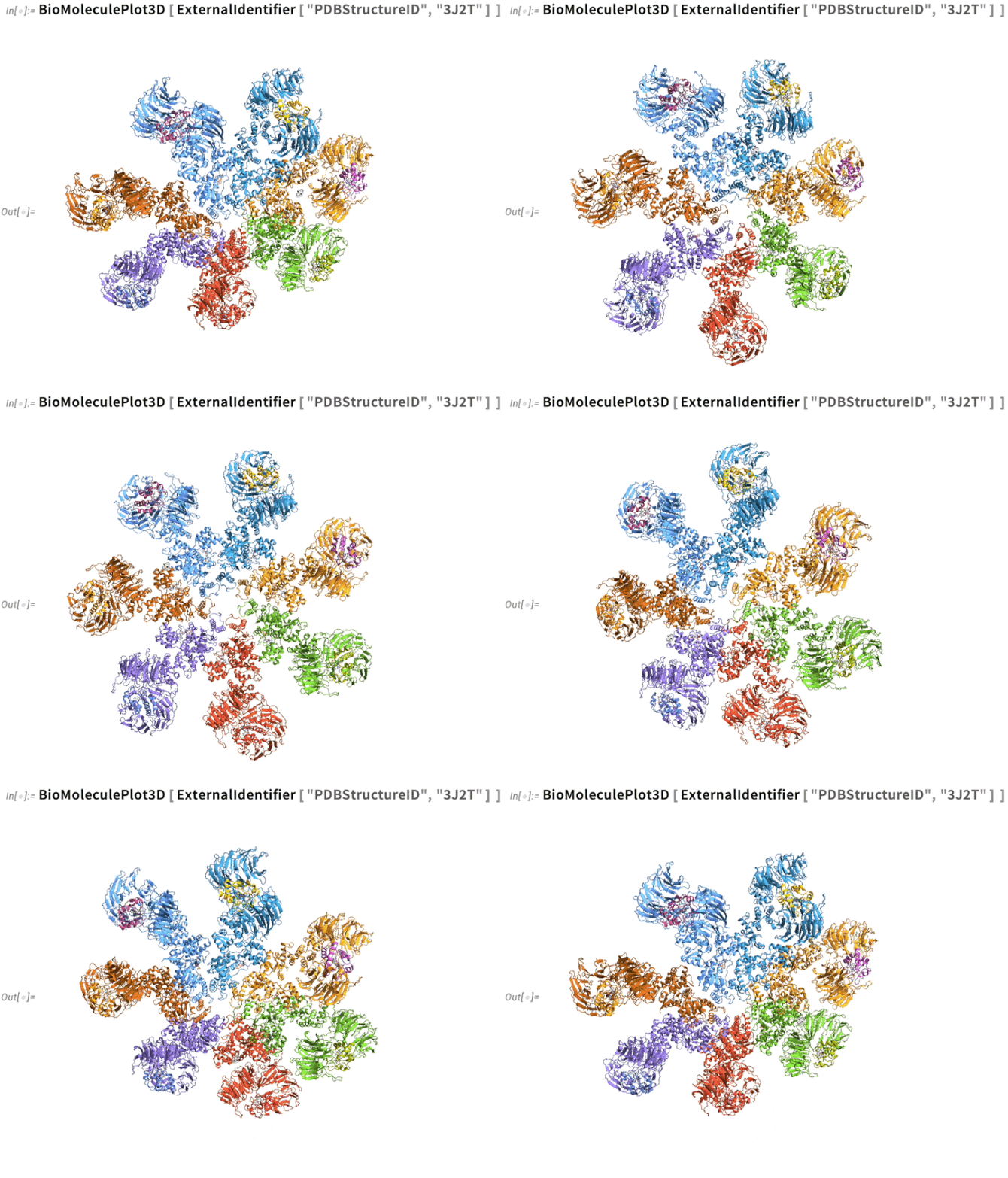
Here, BioMoleculePlot3D visualizes the human apoptosome, a large protein complex involved in programmed cell death. Interactive rendering options make it possible to examine structural features from multiple perspectives and produce figures suitable for research and publication.
Explore More
- Generate Publication-Quality Molecular Structure Diagrams — See how to create customizable 2D and 3D molecular visualizations suitable for research papers, presentations and teaching materials.
- Wolfram Chemistry Example Repository — Browse a growing collection of chemistry examples that illustrate practical Wolfram Language workflows for molecular modeling, chemical analysis and computational chemistry.
- Wolfram Chemistry Paclets — Install a curated collection of chemistry-specific Wolfram Language functions for molecular structures, isomer analysis, chemical pattern matching, quantum chemistry and visualization.
- Wolfram System Modeler for Chemical Engineering — Explore System Modeler examples that demonstrate chemical processes, reaction kinetics, equilibria and process control through interactive engineering models.
- Wolfram Community Chemistry Group — Connect with researchers and practitioners sharing computational chemistry projects, workflows, questions and technical discussions.
Exploring Chemistry with the Wolfram Ecosystem
The strength of the Wolfram ecosystem is that these resources are designed to work together rather than exist in isolation. Whether developing course materials, investigating a research question or building a specialized computational workflow, users can move naturally from molecular representations to data analysis and visualization without changing tools or rebuilding their work.
As computational methods continue to reshape chemistry, researchers and educators increasingly need environments that support complete scientific workflows rather than individual tasks. The resources highlighted here demonstrate how a connected computational foundation can help users spend less time managing software and more time advancing chemical understanding.
| Get full access to the latest Wolfram Language functionality with a Mathematica 15.0 or Wolfram|One trial. |
Comments