 News, Views & Insights
A New Slant in Mathematica
Longtime Mathematica user Flip Phillips recently sent us this tremendously amusing error message generated by Mathematica. Much as you might think when stumbling upon a pickup truck hanging from a tree, your first reaction is probably, “How does something like that even happen??”

The answer is powerful, integrated design. An error message like this is possible only in a system that deeply integrates graphical and symbolic environments, and goes to great lengths to ensure that everything that ought to work, does work.
Flip, unfortunately, did not save anything but a screen shot of the error, so we may never know the exact details of what happened, but it’s not hard to figure out that a Rotate function was involved.
Rotate is a wrapper that makes a lot of sense in the context of graphics. For example, you can rotate a rectangle:
![Graphics[Rotate[Rectangle[{0, 0}, {1, 1}], π/6]]](https://content.wolfram.com/sites/39/2009/09/slantimage02.png "Graphics[Rotate[Rectangle[{0, 0}, {1, 1}], π/6]]")

You can even make a little slider interface to rotate it by different amounts:
![Manipulate[Graphics[Rotate[Rectangle[{0, 0}, {1, 1}], Θ]], {Θ, 0, 2 π}]](https://content.wolfram.com/sites/39/2009/09/newslant-manipulate1.png "Manipulate[Graphics[Rotate[Rectangle[{0, 0}, {1, 1}], Θ]], {Θ, 0, 2 π}]")
But there’s no fundamental reason why Rotate shouldn’t work on everything, including text and mathematical expressions completely outside the context of graphics. And in Mathematica, we try to ensure that if something should work, it does work, because you just never know when it might come in handy.
So for example you can rotate the result of an integration:
![Rotate[Integrate[1/(1 - x^3), x], π/4]](https://content.wolfram.com/sites/39/2009/09/slantimage05.png "Rotate[Integrate[1/(1 - x^3), x], π/4]")
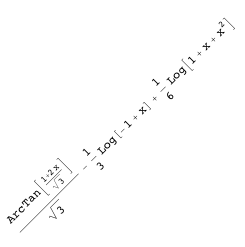
The implementation of Rotate, and similar formatting constructs, is deep and complete. Rotated objects, for example, are perfectly acceptable as variable names:
![Apart[1/(1 - Rotate[bob, 3 Pi/4]^9)]](https://content.wolfram.com/sites/39/2009/09/slantimage07.png "Apart[1/(1 - Rotate[bob, 3 Pi/4]^9)]")

Yes of course you can make an interactive version of that too:
![Manipulate[Apart[1/(1 - Rotate[bob, Θ]^9)], {Θ, 0, 2 π}]](https://content.wolfram.com/sites/39/2009/09/newslant-manipulate2.png "Manipulate[Apart[1/(1 - Rotate[bob, Θ]^9)], {Θ, 0, 2 π}]")
Clearly what happened in the case of this error message is something along these lines:
![Rotate[RandomReal[100, {15, 15}], 3 Pi/4]](https://content.wolfram.com/sites/39/2009/09/slantimage10.png "Rotate[RandomReal[100, {15, 15}], 3 Pi/4]")

Seen in this context, there’s really no mystery: this is simply an error message generated in the course of working with rotated objects, perhaps a raster image meant to go inside a graphics object (which would explain the 2D array of numbers).
What the pickup truck is doing in the tree you will have to figure out on your own.


It may be a cool bug, but I think you’d still have to say it’s a bug…
I donot know mathematica …. I wish i knew mathematica, … amazing programming language …..
Well, yes it’s a bug, but it’s a bug in Flip’s Mathematica code, not a bug in Mathematica itself. Flip wrote some kind of program in Mathematica which is probably trying to display a rotated raster, but he made a mistake in his code, which correctly caused Mathematica to display this error message.
quote:
“but he made a mistake in his code, which correctly caused Mathematica to display this error message”
:), hoho ,a little tricky
The “powerful, integrated design” is a great idea — I only wish Mathematica actually took it more seriously.
While I can Rotate[] everything, I can’t even Translate[] one lousy Plot relative to another.
While I can Show[] multiple 2D plots, I can’t Show[] a 2D plot along with a 3D plot.
While I can create variables using subscripts and superscripts that superficially look like their mathematical counterparts, the illusion falls apart as soon as I try anything sophisticated, because they are constructed via a mechanism completely unlike the way “standard” symbols are constructed in Mathematica.
How about the goal for Mathematica 7.1 be the CONSISTENCY edition?
Maynard are you using Symbolize to create your sub and super scripted symbols?
Could Mathematica violate the Heisenberg Uncertainty Principle? IOW, could Mathematica create code that would accurately render (in visible scale) the behavior of subatomic particles?
Thanks a lot.Good information
I’m also find it frustrating sometimes when I try things and it does not work, but I find it always my fault not Mathematica’s developers.
TRY HARDER Maynard
It was nice,thanks for making mistake in code. ho.ho..ho………!
Mathematica is nice, Mathematica is like woman, you must to write very very nice in order to make many things
thank you so much
Found this page after searching for mathematica 7.1, which I will need because 7.0.1 is a buggy turd. :(
Congratulations !
Very very nice site
Thank you.
Thanks a lot.Good information.
thanks admin…
I second Maynard. When can we Scale[bob,{0,0.5}]? Try flipping a complicated graphics object over the x-axis and then talk to me about deeply integrated systems.
Your site is very good. There are useful information and most importantly, for sharing great. Thank you.
is the math invented or discovered? :)